MiniSeq Control Software v2.0 Error “Invalid Role” occurs soon after run start from Local Run Manager v2.4.1
03/11/22
An issue has been identified that impacts MiniSeq Control Software v2.0 runs set up with Local Run Manager. This issue causes the run to stop several seconds after the run is started and generates an “Invalid Role” error.
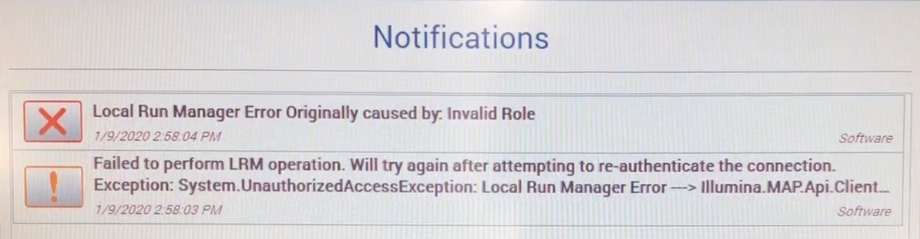
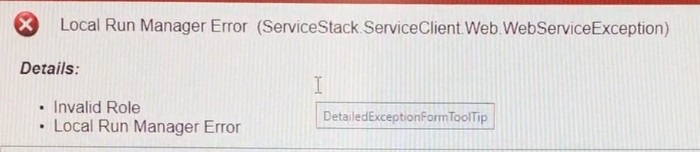
The error occurs when User Management is enabled in Local Run Manager and the user initiating the run in MiniSeq Control Software has a "User" level role, instead of an "Admin" level role. Determine role level by navigating to Local Run Manager Dashboard > Menu > Tools > User Management.
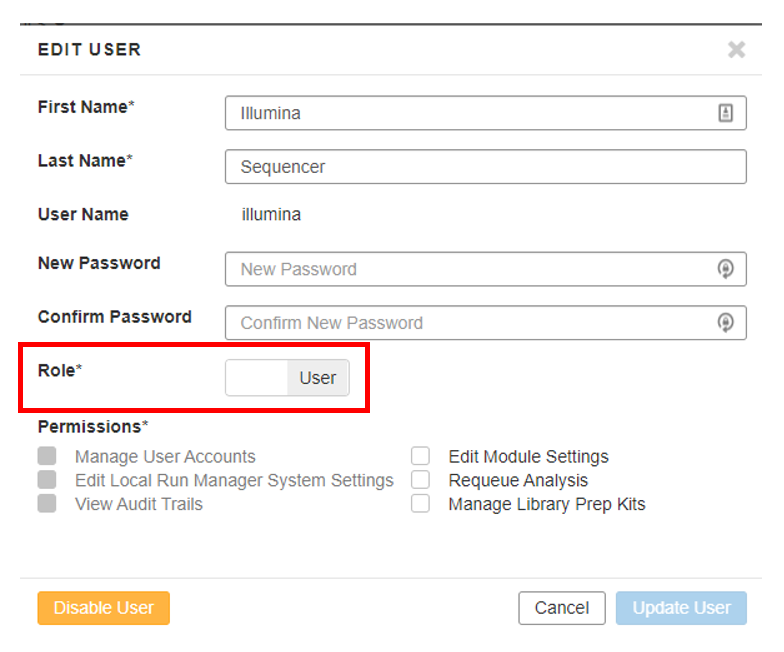
This issue affects only systems running MiniSeq Control Software v2.0 on MiniSeq instruments.
Illumina developers are aware of the issue and are working on a solution.
Currently, there are two workarounds:
- If User Management is enabled, the run can be initiated in MiniSeq Control Software by selecting Sequence > Set up Runs using Local Run Manager. At the Local Run Manager login screen, log in using a Local Run Manager account that has an Admin-level role then continue with the run set-up process.
- User Management can be disabled by a Local Run Manager user with Admin privileges:
- In Chromium, open Local Run Manager and log in with an Admin-level role account.
- Navigate Menu > Tools > User Management.
- Toggle Enable User Management to Off.
- In MiniSeq Control Software, initiate the run by selecting Sequence > Set up Runs using Local Run Manager. Now, log in with Local Run Manager is no longer necessary.
Because the error occurs only a few seconds after starting the run, the loaded reagents are not marked as used and can be used for the new run set-up.